Web Server Security Options
The configuration sites for the Laserfiche repository web client, Directory Server, and Forms include a security section that assists administrators with securing the web app. Configure HTTP response headers without having to manually create custom headers in IIS and enable options designed to prove protection against cross-site request forgery attacks.
HTTP Security Headers
The  configuration page sets default options for the following headers:
- HTTP Strict-Transport-Security (HSTS) header
- X-Content-Type-Options header
- X-Frame-Options header
- Content-Security-Policy header
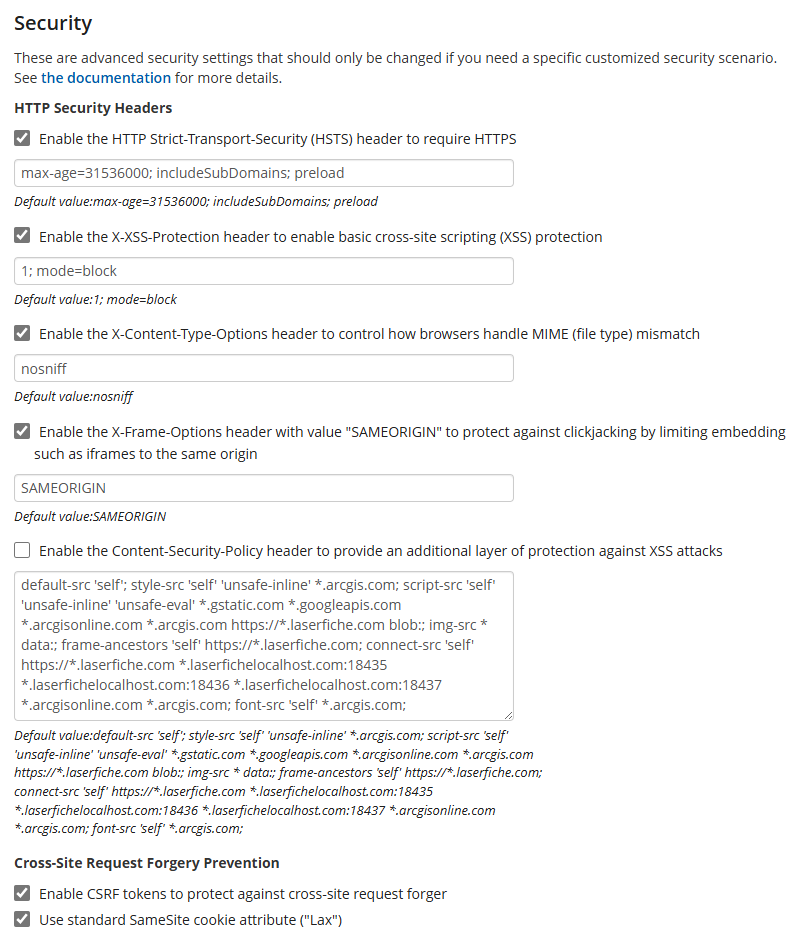
HTTP Strict-Transport-Security (HSTS) header
The HTTP Strict-Transport-Security (HSTS) header defines a mechanism enabling web sites to declare themselves accessible only via secure connections. Requiring secure connections can significantly reduce the ability of man-in-the-middle type attacks to intercept requests and responses between servers and clients. When the option is selected, the repository web client informs the web browser to load the site with HTTPS.
Default value: max-age=31536000; includeSubDomains; preload
- The max-age directive defines the limit time(in seconds) for how long that the web browser should remember that a site is only to be accessed using HTTPS. 31536000 seconds is equal to 1 year.
- The includeSubDomains directive indicates that the rule applies to all of the site's subdomains as well.
- The preload directive enables HSTS Preloading which makes browser be already aware that the host requires the use of SSL/TLS before any connection or communication even takes place.
Note: HSTS Preloading is a mechanism whereby a list of hosts that wish to enforce the use of SSL/TLS on their site is built into a browser. This list is compiled by Google and is utilized by Chrome, Firefox and Safari. These sites do not depend on the issuing of the HSTS response header to enforce the policy, instead the browser is already aware that the host requires the use of SSL/TLS before any connection or communication even takes place. This removes the opportunity an attacker has to intercept and tamper with redirects that take place over HTTP. This isn't to say that the host needs to stop issuing the HSTS response header, this must be left in place for those browsers that don't use preloaded HSTS lists.
X-Content-Type-Options header
The X-Content-Type-Options header indicates that the MIME types advertised in the Content-Type headers should be followed and not be changed. The header allows users to avoid MIME type sniffing.
- Default value: nosniff
Setting the header to nosniff blocks a request if the request destination is of type style and the MIME type is not text/css, or of type script and the MIME type is not a JavaScript MIME type.
X-Frame-Options header
The X-Frame-Options header can be used to indicate whether or not a browser should be allowed to render a page in a <frame>, <iframe>, <embed> or <object> element. Use of the header can avoid click-jacking attacks, by preventing the site from being embedded into other sites.
- Default value: SAMEORIGIN
The SAMEORIGIN directive indicates that a page can only be displayed if all ancestor frames are same origin (i.e., domain) to the page itself.
Content-Security-Policy header
The Content-Security-Policy (CSP) header allows website administrators to control resources the browser is allowed to load for a given page. This helps protect against cross-site scripting (XSS) attacks.
- Repository web client default value: default-src 'self'; style-src 'self' 'unsafe-inline' *.arcgis.com; script-src 'self' 'unsafe-inline' 'unsafe-eval' *.gstatic.com *.googleapis.com *.arcgisonline.com *.arcgis.com https://*.laserfiche.com blob:; img-src * data:; frame-ancestors 'self' https://*.laserfiche.com; connect-src 'self' https://*.laserfiche.com *.laserfichelocalhost.com:18435 *.laserfichelocalhost.com:18436 *.laserfichelocalhost.com:18437 *.arcgisonline.com *.arcgis.com; font-src 'self' *.arcgis.com;
- Directory Server STS default value: default-src 'self'; img-src * data:; frame-ancestors https://*.laserfiche.com;
Important: If you want to enable Microsoft Office Online Server, you need to modify the Content-Security-Policy header to include the Office Online Server URL in the frame-src directive. You may need to check the browser console to see if the Office Online Server URL is refused by the Content-Security-Policy header.
Note: See https://developer.mozilla.org/en-US/docs/Web/HTTP/Reference/Headers for more information about HTTP headers.
Cross-site Request Forgery Prevention
Enable CSRF tokens to protect against cross-site request forgery
CSRF tokens (also called request verification tokens) are a common technique used to prevent cross-site request forgery(CSRF) attacks on ASP.NET MVC applications. Due to same-origin policies, a malicious page cannot read a user's tokens.
Use standard SameSite cookie attribute ("Lax")
The SameSite attribute allows a site to declare whether a cookie should be restricted to a first-party or same-site context. Setting the attribute value to Lax configures the site so that cookies are not sent on normal cross-site subrequests (for example to load images or frames into a third party site), but are sent when a user is navigating to the origin site (i.e., when following a link).