Advanced Server Options: General
To configure the General tab
- Select the Advanced Server Options node or any server details in the center Details Pane.
- Click Properties in the Actions Pane, or right-click and select Properties.
- Select the
 General tab of the Advanced Server Options dialog box.
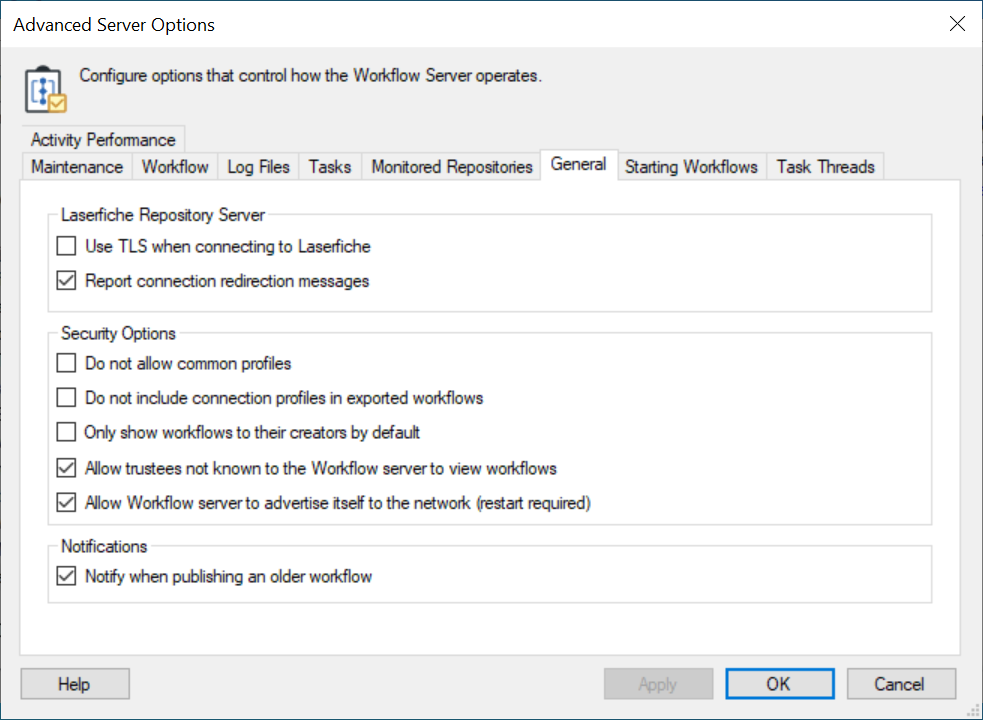
Laserfiche Repository Server
-
Use TLS when connecting to Laserfiche to secure network communications when connecting to Laserfiche. You must have your Laserfiche Server set up to use TLS for this option to work.
Note: This setting will affect the Workflow Server's connections, the Workflow Administration Console's connections, and, after being restarted, the Designer's connections to Laserfiche. Because the Workflow Server applies the TLS settings to the programs it is connected to, your Workflow connection profiles will have to specify repositories by using their fully qualified domain name.
Note: You must restart the Workflow Subscriber Service for this setting to apply.
-
Report connection redirection messages to display connection redirection messages when Workflow connects to Laserfiche.
Security Options
-
Do not allow common profiles to prevent users from creating or selecting common profiles.
-
Do not include connection profiles in exported workflows to prevent connection profile authentication credentials from being exported in .wfi files and to prevent connection profiles from being imported from a .wfi file.
When exporting a workflow, credentials in the following objects will not be exported into .wfi files:
- connection profile
- data source
- email server
- web service
When importing a workflow, the import wizard will not allow the following objects with credentials:
Connection profile: You will need to select an existing profile or create a new profile and then select it.
Data Source: You will need to use an existing object.
Email Server: You will need to use an existing object.
Web Service: You will need to use an existing object. -
Only show workflows to their creators by default to turn on an additional security option for all newly created workflows. In the Workflow Definitions node in the Workflow Administration Console, the Only allow specified users to access the workflow option will be enabled for the new workflow definitions.
-
Allow trustees not known to the Workflow server to view workflows to allow users who are not explicitly registered or represented by any groups in the Permissions and Rights Node of the Workflow Administration Console to view workflows.
-
Allow Workflow server to advertise itself to the network to include the Workflow host in the drop-down menu in the Choose Workflow Server dialog boxes in the Workflow Designer and the Workflow Administration Console.
Note: Restart required.
Notifications
-
Notify when publishing an older workflow to configure Workflow to display a warning message in the Workflow Designer when you attempt to publish changes to a workflow that has been republished while you were editing.
Application Information
-
Allow software usage information to be collected and sent to Laserfiche for troubleshooting and product improvement to allow data collection.