Configuring Content Security Policy
Configure specific content security policy directives. The frame-ancestors directive controls which external sites may embed your Laserfiche public forms or surveys inside an iframe. Default origins are required for the service to function and cannot be changed.
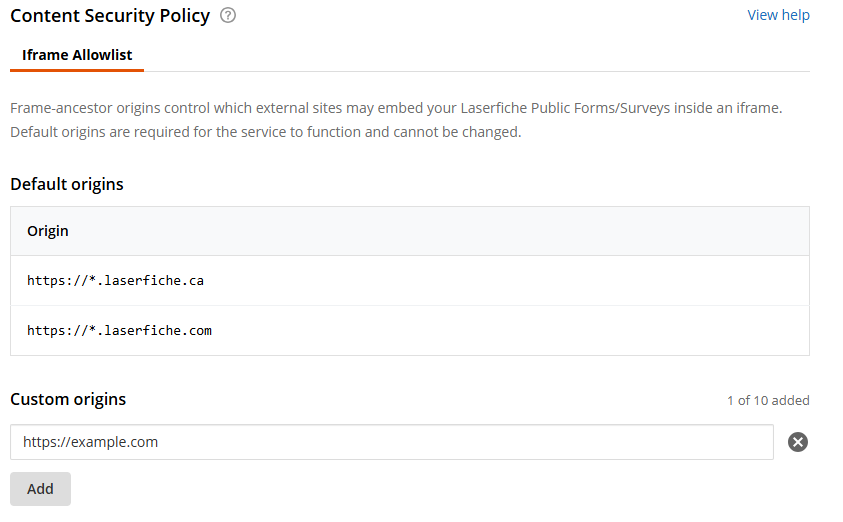
Add custom origins to the iframe allowlist
- Open the Laserfiche Account Administration.
- Click Settings and the Content Security Policy tab.
- In the Iframe Allowlist, add the websites that will be allowed to embed your public forms and surveys in an iframe.
- Click Save Changes.
Valid origin values:
- Must start with "https://".
- Must contain a valid HTTPS domain name.
- Must be 255 characters or less.
- Cannot contain duplicates.
- Can include subdomain wildcards. (e.g., https://*.example.com)
Important: If your public forms and surveys are embedded on external websites, ensure that the appropriate sites are added to the allowlist before January 7, 2027.
Verifying that the allowed origins are correctly recognized
After saving the changes to the allowlist, browse to the specified site that contains an iframe with the public form or survey and open the web browser's developer tools. Check the console to see if there is a content security policy violation.
- When viewing the page with the iframe with an embedded public form or survey, press the F12 key to open the browser developer tools.
- Click the Console tab.
- Check for whether there is an error involving the content security policy frame-ancestors directive. When properly configured, there is no error. If there is an error, re-verify that the page's origin matches an enrty in the the allowlist.
Frequently Asked Questions
- Question: When is it necessary to configure an iframe allowlist?
Answer: The policy affects Laserfiche Cloud accounts with business processes that have a published public starting form or survey where the form or survey is also embedded in an iframe on a site that is separate from Laserfiche Cloud.
Forms or surveys that are opened from a hyperlink are not affected.
- Question: How can you tell whether a business process has a public starting form or whether a survey is public?
Answer: View the list of business processes and select a business process in the list. View the Process Details and verify the value under the Starting form privacy section. If the value is Public, the form is affected by the policy.
View the list of surveys and select a survey in the list. View the survey details and verify the value under the Survey privacy section. If the value is Public, the survey is affected by the policy.
- Question: When does the policy take effect?
Answer: The policy takes effect on January 7, 2027. Prior to the enforcement date, Laserfiche logs violations and visitors to a page with the embedded iframe can see a console error reporting the violation.