Laserfiche Cloud Documentation
Welcome to Laserfiche Cloud.
Laserfiche Cloud empowers organizations to work smarter by combining robust document management, intuitive process automation, and built-in AI in a secure, cloud-native platform.
Centralized, intelligent document management
Store, organize, and access all your digital and scanned documents from anywhere. Laserfiche automatically classifies, extracts, and summarizes key information, thus turning unstructured content into searchable, actionable insights within seconds.
Low‑code process automation that drives efficiency
Use drag‑and‑drop workflows, processes, and forms to automate routine tasks like approvals, invoice routing, contract reviews, and record requests. Gain full visibility into process performance with built-in analytics, all without any coding or IT help required.
AI that accelerates decisions and enhances productivity
Harness natural-language AI tools like Smart Fields to auto-extract metadata, Smart Chat to query your documents conversationally, and instant summarization of meeting notes or contracts. All AI models respect your security and privacy.
Document Management
Laserfiche Cloud includes an online document management system, allowing you to upload, view, and work with your content using a streamlined web interface. You can access your content wherever you go, whether from a computer or on a mobile device. Laserfiche Cloud also provides you with robust tools to ensure that your data is secure.
Overview of Laserfiche Cloud
This video provides an overview of Laserfiche Cloud, an AI-driven content and process automation platform that lets users capture, manage, search, secure, and automate documents from anywhere. It highlights key features including Smart Chat, Smart Fields, records management, security controls, process automation, reporting, and integrations with Microsoft 365, Salesforce, and other business systems.
Capturing Content
With Laserfiche Cloud, you have many options for capturing your content, whether you're archiving paper documents or storing files from your computer. When capturing documents--whether scanned physical documents or electronic files--you can also capture information about those documents for later reference.
Laserfiche Cloud offers many ways to capture files, allowing you to quickly store all the information your organization needs in one place, wherever you are.
- In the Laserfiche Cloud website, you can import files directly from your computer.
- Laserfiche Scanning allows you to easily convert paper records to files in Laserfiche.
- Import Agent enables you to import large numbers of files in bulk, schedule import for off-peak times, and capture information about them.
- The Office Plug-in allows you to quickly save Microsoft Office documents to Laserfiche, and work with them from within Laserfiche. You can also use the Office Plug-in to quickly archive emails from Microsoft Outlook and capture information about the emails.
- Legacy Laserfiche App for iOS and Android allows you to access and capture documents on the go using your phone or tablet.
- Laserfiche Snapshot allows you to quickly save an archival TIFF image version of any file type to Laserfiche.
- Laserfiche Connector lets you capture information directly from third-party applications.
- Quick Fields is Laserfiche's powerful, automated capture solution for both scanned and electronic documents. It enables batch-processing sessions that intelligently identify document types, extract key data (like dates or invoice numbers), apply annotations, and populate metadata. Configurable workflows support advanced scenarios, such as handling mixed document types, transforming extracted values, routing based on content, and performing live database lookups, all without manual input.
Searching and Locating Content
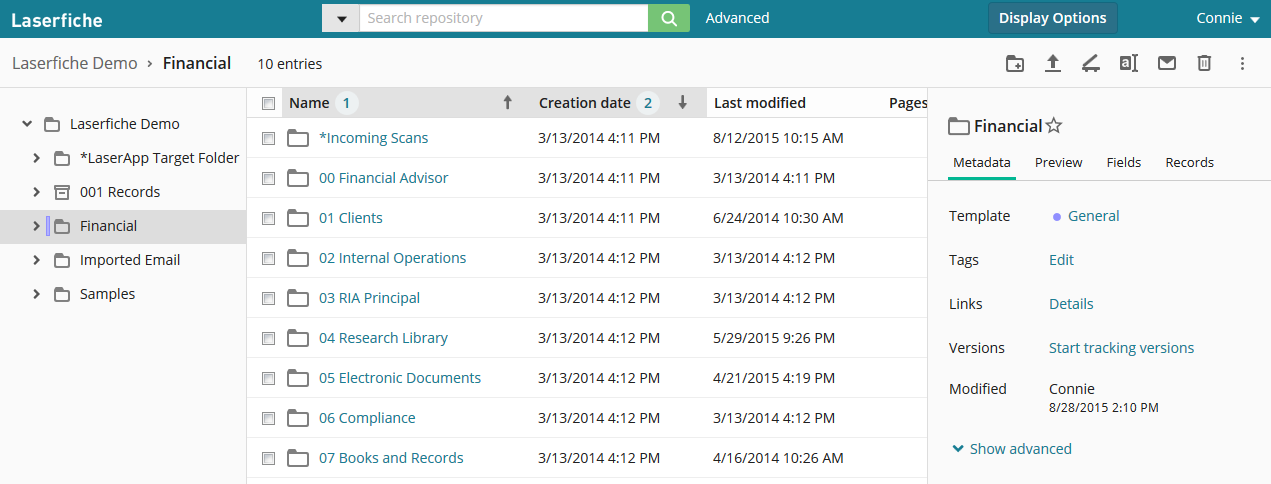
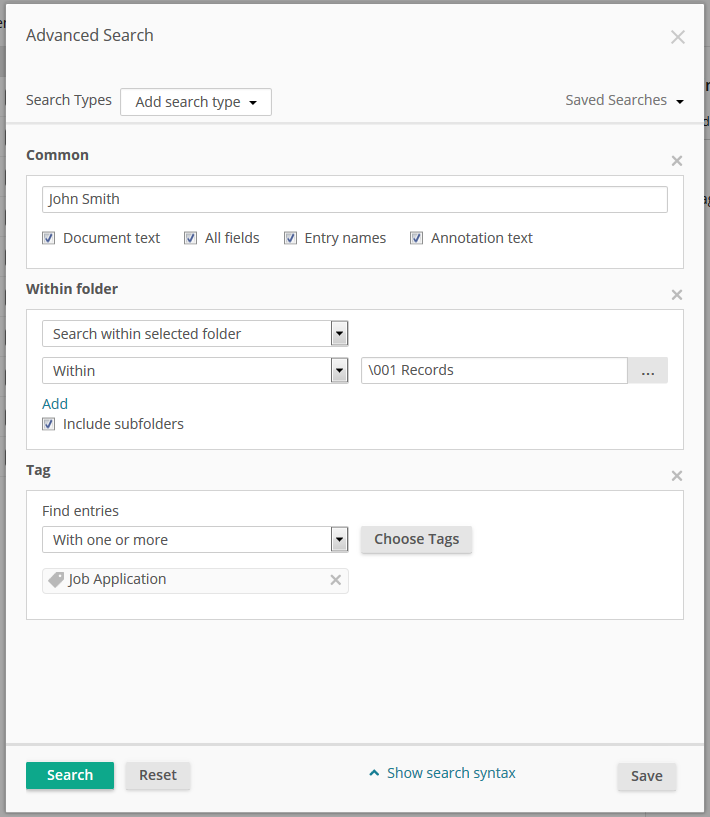
Laserfiche Cloud provides you with many tools for quickly locating exactly the information you need. It features a familiar, intuitive folder structure system that allows you to organize your documents in the best way for your organization. In addition, Laserfiche includes powerful search tools to help you pinpoint the document you need. You can perform a quick search to easily find documents without additional configuration, or you can perform an advanced search to take advantage of the many search options to fine-tune your search. Once you've located a document, you can also search within that document and jump directly to the section you need.
Quick access views allow you to find relevant documents and folders without even needing to perform a search. The Starred quick access view lists all the documents you have marked with a star, allowing you to find them again easily. You can also view a list of all the documents you've recently opened, and all the documents that you are currently using. In addition, records managers can quickly find documents ready for certain records management actions.
Working with Documents
Once you've stored documents in Laserfiche Cloud, the web interface provides many ways to work with them. You can open and work with electronic files (such as spreadsheets or Word documents) in their native applications. You can also view scanned or Snapshot-printed imaged documents directly in Laserfiche Cloud.
In addition, Laserfiche Cloud gives you many tools for working with documents. Annotations allow you to add information to document pages, such as redactions to hide sensitive information or sticky notes and text boxes to make notes for future reference. Metadata allows you to capture additional information about the document, organize your documents, and make them easier to find. For example, you can use a field to store information such as a client's name or a document type, or a tag to categorize the document. You can then search on this information to quickly locate them in the future. To ensure that information about a document is never lost, you can enable version tracking, which will save a history of the document's changes for future reference, and allow you to revert to a prior version if you need to undo a change.
The Laserfiche Office Plug-in also allows you to easily work with Microsoft Office documents directly in the relevant Office application while still taking advantage of Laserfiche features such as metadata and tokens. When working with Office documents, the documents will be automatically checked out when you begin editing to ensure that multiple users don't cause conflicting edits.
Free Training: View the Getting Started with Laserfiche Guide in Aspire.
Public Portal
Managing Records, Retention, and Disposition
Records management features in Laserfiche allow you to process records and record folders according to a life cycle, through creation, retrieval, storage, and disposition. Records managers can define file plans and configure retention rules specific to their organization, and then view properties and status information for individual records and record folders in the Records tab of the Metadata Pane. You can access this information in the Folder Browser or when viewing a record in the Document Viewer. The life-cycle timeline displays the record's history and disposition eligibility, and eligible actions such as cutoff, transfer, accession, and destruction can be performed directly on the timeline. Records managers can quickly generate reports of records currently eligible for cutoff, disposition, and vital record review through the Records Management quick access list. Disposition actions can then be performed directly from the report.
Securing and Auditing Your Information
Ensuring that your information is secure is a vital part of document management. Laserfiche offers many ways for you to protect your content. Entry access rights allow you to determine exactly what users have the rights to perform what actions on specific documents and folders. Privileges grant or restrict the ability to perform certain tasks across the entire repository. Field and template rights give you more specific control over who can view what metadata about a document. In addition, security tags allow you to restrict access to documents on a document-by-document basis, and redactions allow you to restrict access to information on specific parts of document pages.
Auditing enables you to track activities performed in a Laserfiche repository and generate reports of those activities. Combined with other aspects of the Laserfiche system, auditing not only helps to show compliance with legal regulations, but also contributes to the security of the Laserfiche repository. Laserfiche auditing gives you fine-grain control over how auditing options are configured, allowing you to audit by user or group and audit both successful and failed attempts to perform an action. You can also specify that certain types of actions (such as document deletion or export) will require users to provide a reason. Once you have selected events to audit, you can view, filter, and export audit information in Audit Reports. You can create reports to analyze audit data, view the information as a chart, filter it to include only the information relevant to you, and export the data for use in spreadsheet programs such as Microsoft Excel.
Integrating with Other Applications
Laserfiche provides you with many ways to integrate with other applications. In addition to the Office Plug-in, Laserfiche Cloud includes a native integration with Docusign. The Docusign integration allows you to request signatures on your documents.
In addition to these integrations, Laserfiche Cloud includes Laserfiche Connector, which allows you to integrate with most line of business applications without the need for coding or specialized technical expertise. With Laserfiche Connector, you can capture information from third-party applications, directly launch a Laserfiche search based on information in those applications, or quickly open relevant documents and update their metadata.
Process Automation
Laserfiche Cloud process automation connects documents, data, systems, and people through a unified, low-code platform. Automations can be built with drag-and-drop design and monitored in real time. You can seamlessly integrate with third-party applications, fill process gaps, and gain insight into performance, all with full governance and without coding.
Workflows
Workflows are the backbone of Laserfiche's automation capabilities, designed to eliminate repetitive, document-centric tasks. Using a visual, drag-and-drop designer, you can build sequences of activities, such as routing documents for approval, updating metadata, sending notifications, or integrating with other systems. Workflows can be started by events like document uploads or form submissions, and they include built-in monitoring and analytics to track performance and troubleshoot issues. This makes them ideal for automating high-volume, rule-based processes that previously required manual intervention.
Business Processes (Forms + BPMN)
Business Processes extend automation beyond documents to include human interaction and decision-making. Built on BPMN (Business Process Model and Notation), they allow you to design structured, multi-step processes that involve forms, approvals, and conditional logic. These processes are perfect for scenarios like onboarding, purchase requests, or contract reviews, where tasks need to be assigned to specific users or roles. The designers provide intuitive tools for creating forms, starting events, and tasks, while reporting features give visibility into process status, bottlenecks, and completion times.
Rules
Rules provide a centralized way to manage business logic across workflows and processes. Instead of embedding logic in multiple places, you can create reusable rules for data lookups, calculations, decision tables, document merges, and even API calls. This modular approach simplifies maintenance and ensures consistency, as updates to a rule automatically apply wherever it's used. Rules can also handle advanced scenarios like conditional routing or dynamic field population, making them a powerful tool for creating intelligent, adaptable automations.
Surveys
Surveys allow organizations to collect structured input from internal or external users through customizable, web-based forms. They feed responses directly into automated processes, enabling quick data capture and streamlined processing without manual intervention.
External Data Sources
External data sources enable Laserfiche to connect with your organization's existing systems and databases, ensuring that processes run on accurate, real-time information. You can configure connections to SQL databases, CSV files, or other systems, and then use these sources to populate forms, validate entries, or drive workflow decisions. This integration reduces manual data entry, minimizes errors, and keeps your processes aligned with the latest business data. By bridging Laserfiche with external systems, you create a seamless flow of information across your enterprise.
Capture Profiles
Capture Profiles define how Laserfiche automatically processes incoming documents, whether scanned or electronic, by applying rules for classification, metadata extraction, and storage. They ensure documents are indexed and searchable from the moment they enter the system, reducing manual data entry and accelerating downstream automation.
Process Automation Integrations
Laserfiche's process automation integrates seamlessly with external systems and applications to create a unified digital ecosystem. Through REST APIs, web requests, and connection profiles, you can link workflows and business processes to ERP, CRM, HR, and financial platforms for real-time data exchange. These integrations enable dynamic form population, automated record updates, and cross-system triggers, eliminating silos and ensuring that every process runs on accurate, up-to-date information. Laserfiche delivers end-to-end automation that bridges modern and traditional environments without custom coding.
Solution Marketplace
Laserfiche's Solution marketplace houses hundreds of workflow and form templates to accelerate your ROI and jumpstart your business transformation. These pre-built automation processes, shared by Laserfiche and the Laserfiche community, cover everything from HR onboarding to contract review and include customizable workflows, forms, and rules that you can import directly into your Laserfiche Cloud environment.
Laserfiche AI
Laserfiche Cloud's AI suite transforms your content into actionable intelligence with powerful, privacy-first tools. Smart Fields uses natural language prompts to automatically classify documents and extract structured metadata, from invoices and contracts to handwritten forms and tables, enabling rapid indexing and reduced manual entry. Smart Chat turns your repository into an interactive knowledge base, allowing users to query documents conversationally and receive instant, reference-linked answers. With Document Summarization, generative AI condenses long reports, transcripts, and legal files into succinct summaries, saving hours of review time. Laserfiche AI always ensures complete privacy. Your data never trains external models. Together, these AI capabilities elevate productivity, reduce friction, and make every document smarter, all without compromising security or governance.
Submitting Feedback
Have feedback you'd like to share with the Laserfiche development team? You can submit feedback by selecting your user name in the upper right corner wherever you are in Laserfiche Cloud, and then selecting Feedback. Specify whether you want to submit feedback on existing features and behavior, or suggestions for new features. If you want to allow Laserfiche to follow up with you, select You may contact me about this feedback.