Getting Started with Process Automation
Process automation refers to using Laserfiche tools to design, execute, and monitor workflows that handle routine tasks without manual intervention. It combines forms, rules, and integrations to create end-to-end solutions for common business needs. By automating processes, you can reduce manual effort, minimize errors, and create a more scalable solution for managing business operations.
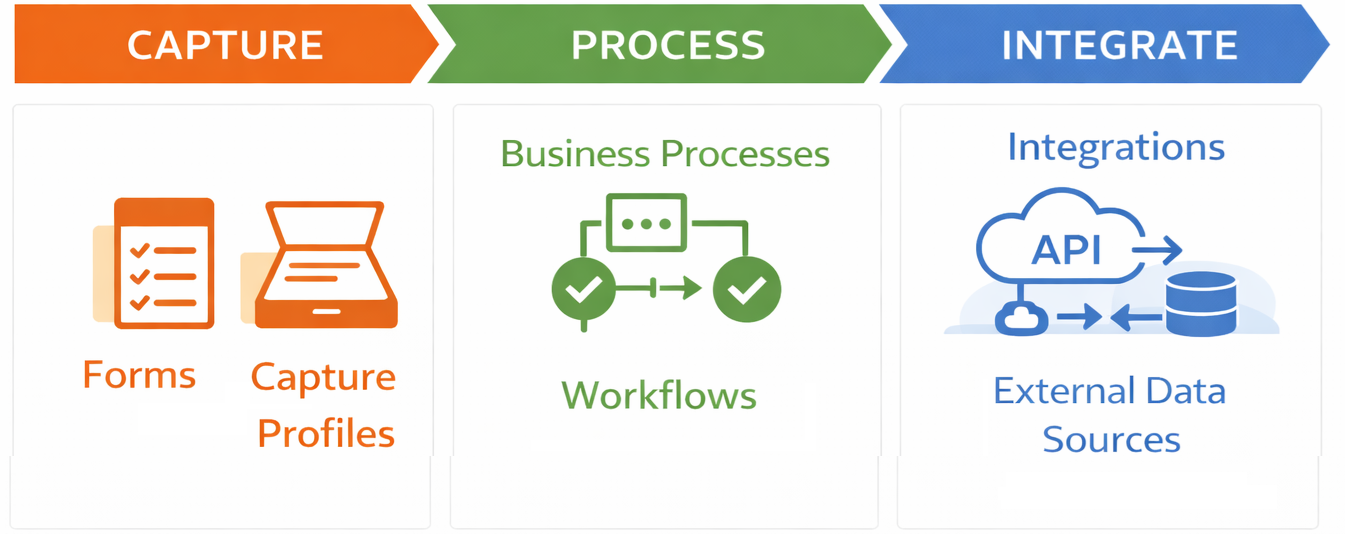
Benefits of Process Automation
- Increased efficiency and reduced manual workload.
- Improved accuracy and compliance.
- Enhanced visibility into process performance.
Security
Process automation security in Laserfiche Cloud is enforced through platform controls and Process Automation–specific roles. At the platform level, Laserfiche Cloud provides tenant isolation, encryption in transit (TLS 1.2+ with PFS) and at rest (AES‑256), fine‑grained repository access rights, MFA/SSO options, and comprehensive audit logging for user actions. Within Process Automation, administrators assign scoped access rights and roles (e.g., Process Administrator, Process Developer, Process Manager) to control who can design, run, or view automations and data; team roles further refine visibility of resources and submitted data inside projects. Secure integration patterns are supported via OAuth‑based connections for APIs (service principals, web apps, SPAs with PKCE) and Remote Agents for safely reaching internal data sources behind a firewall, ensuring credentials are managed correctly and sensitive systems never need to be exposed publicly. Finally, auditing (including advanced audit trail features) enables monitoring, reporting, and evidence for compliance by tracking successful and failed actions, with options to require reasons for sensitive events like deletion or export.
Security in Process Administration
Core Elements of Process Automation
Business Processes
Laserfiche Business Processes combine forms, routing logic, and task tracking to ensure processes are consistent, auditable, and aligned with organizational policies. It provides a framework for modeling and managing processes that involve human interaction, such as approvals, reviews, and task assignments.
Example: A new hire completes a Laserfiche Form with personal details. The Business Process routes tasks to HR for document collection, IT for account setup, and the manager for approval, all tracked in a process dashboard.
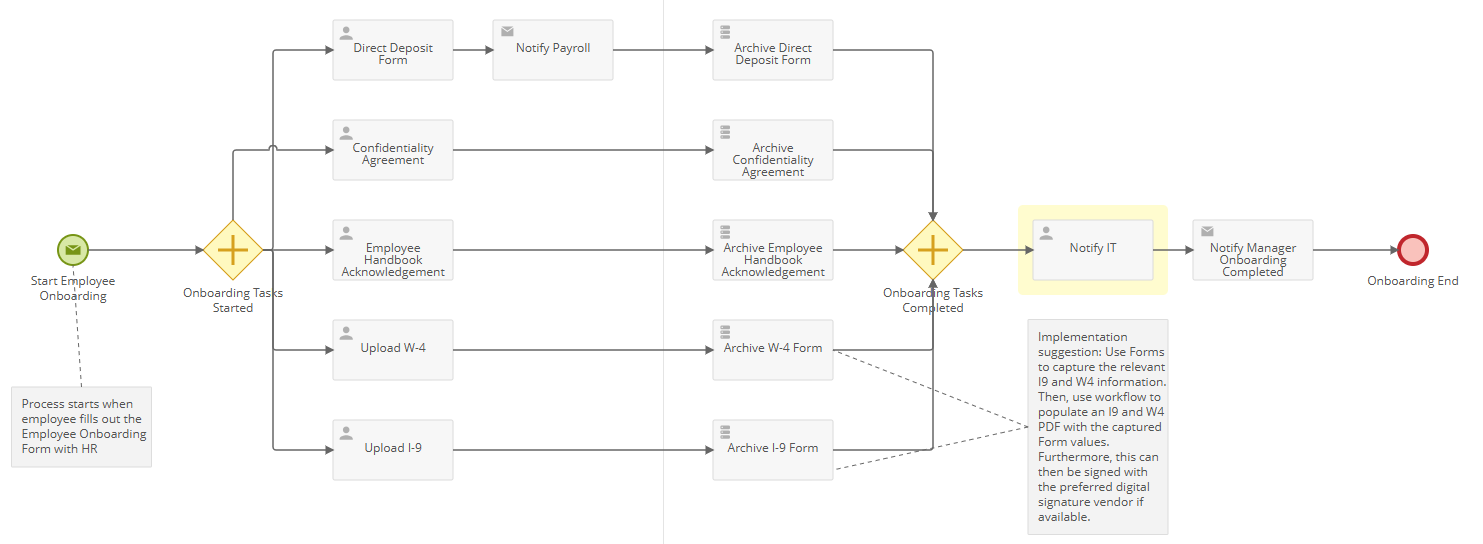
Reporting in Laserfiche Business Processes provides visibility into process performance by tracking task completion, bottlenecks, and overall progress. It enables administrators to monitor SLAs, generate audit trails, and analyze metrics for continuous improvement.
Workflows
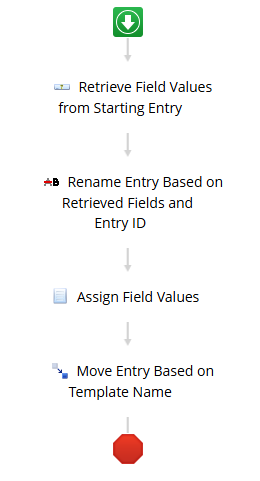
Laserfiche Workflow focuses on system-level automation to automate document-centric tasks. It uses a visual designer to build logic-driven steps, enabling organizations to streamline repetitive tasks such as routing documents, updating metadata, sending notifications, and integrating with other systems.
Example: When a document is uploaded to a repository, Workflow automatically renames it, applies metadata, and moves it to the correct folder based on predefined rules.
.
Rules
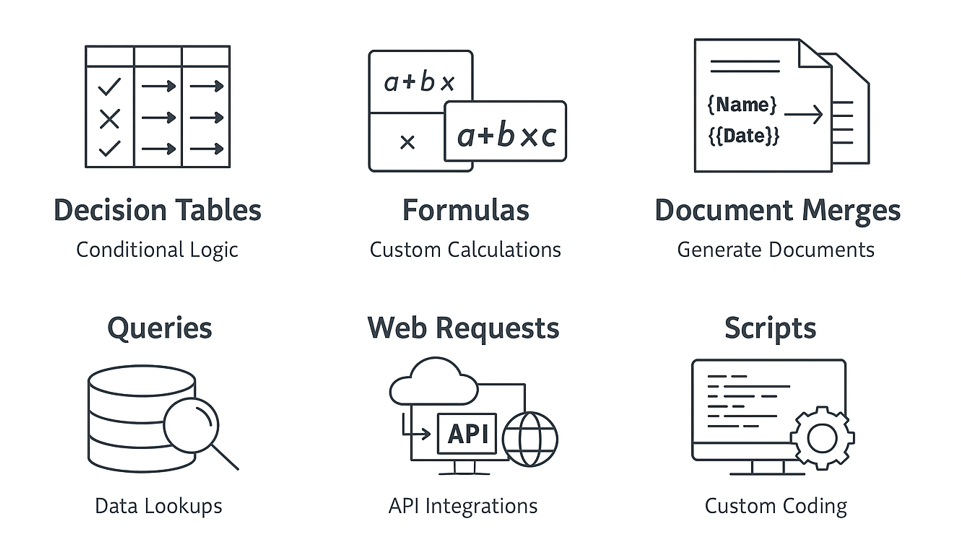
Laserfiche Rules provide a centralized way to automate decision-making and dynamic actions within workflows and business processes. They include components such as formulas for calculations, decision tables for complex routing, queries for data lookups, web requests for API calls, scripts for custom logic, and document merges, ensuring processes remain flexible, consistent, and powerful.
Integrations and External Data Sources
Integrations and external data sources in Laserfiche process automation enable workflows and business processes to connect with other systems for real-time data exchange. They allow automations to perform tasks such as retrieving information through queries, sending web requests to APIs, and updating external applications, ensuring processes remain accurate, dynamic, and aligned across platforms.
Capture Profiles
Capture profiles in Laserfiche define how documents are imported, processed, and stored in the repository. They include settings for capture sources, metadata templates, file naming, and automated actions like OCR or routing, ensuring consistent and efficient document ingestion.
Additional Process Automation Components
- Starting Events: Define how and when workflows start.
- Surveys: Create forms to collect data for analysis outside of structured processes.
- Files: Upload attachments for processes to reference.
- Settings: Manage business options for processes.
You can learn how to change your site and account settings by going to Editing Account Settings.
Next Steps
- Review Best Practices to design secure and efficient automations.
- Start building your first automated process!
About the ProcessAutomationUser
Each Laserfiche Cloud account with Process Automation includes the ProcessAutomationUser user account. This user is intended for use with Process Automation, and does not support direct login. By default, this user has full feature rights and privileges so that automated processes can perform required actions. If your account utilizes security tags, those tags must be added to the ProcessAutomationUser in order for it to act upon those entries that have a tag applied. See the Granting Security Tags to Users documentation for more information.