Hit Policies
The decision table can use either a single or multiple hit policy. The single hit policy says that the decision table should return the output of only one rule. The multiple hit policy says that the decision table should return either one output of multiple rules or the result from some function on the outputs (like the average of the values). In the dialog to select a hit policy, you can choose from the following policies.
Selecting a Hit Policy
The hit policy helps recognize the decision table type and unambiguously interpret the decision table logic. In other words, this helps decide how many and which of the matched rules to include in the result of the decision table.
To select a hit policy:
- Select the hit policy name in the general properties pane on the right.
- In the dialog, select a hit policy. (More information below)
- Click Submit.
Single Hit Policies
Unique Hit Policy
A decision table with a Unique hit policy validates successfully only when the decision table does not have overlapping rules. In other words, any set of input values must match only one rule (e.g., one input captures values over 50, another under or equal to 50). This is the default policy for a decision table.
Sample
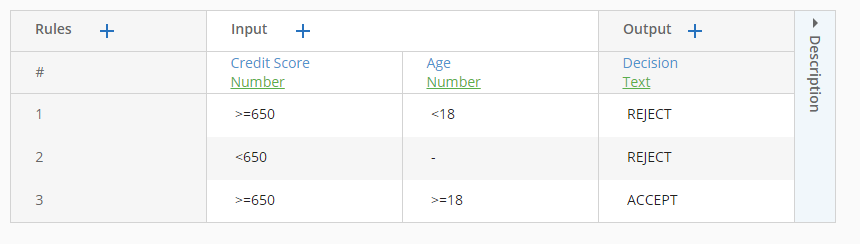
The following decision table describes a credit card approval policy. According to the policy, an applicant must have a minimum credit score of 650 and be 18 or older. Because each combination of inputs results in a match and no two rules overlap, the decision table validates successfully.
Example
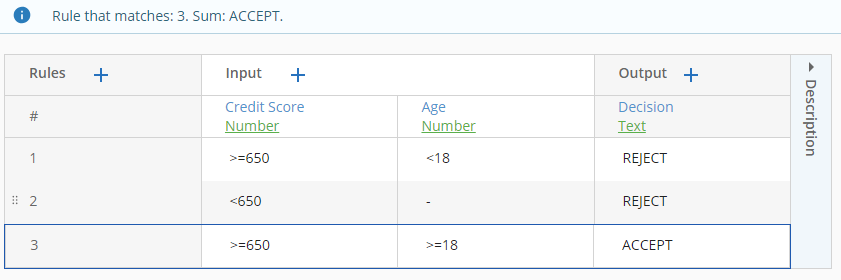
An applicant has a credit score of 680 and is 20 years old. The decision table editor outlines the matching rule:
Any Hit Policy
The rules on a decision table with this hit policy can overlap only if the overlapped rules have the same output entries. The decision table does not validate successfully with this hit policy when the output values are not equal.
Sample
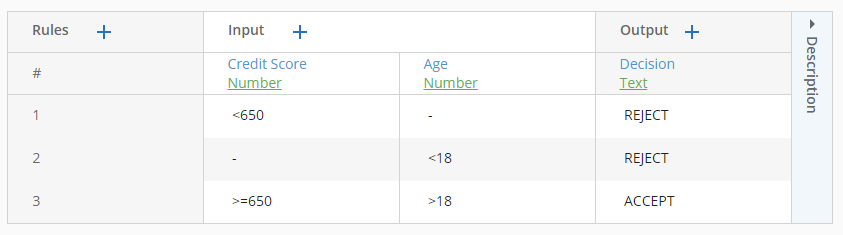
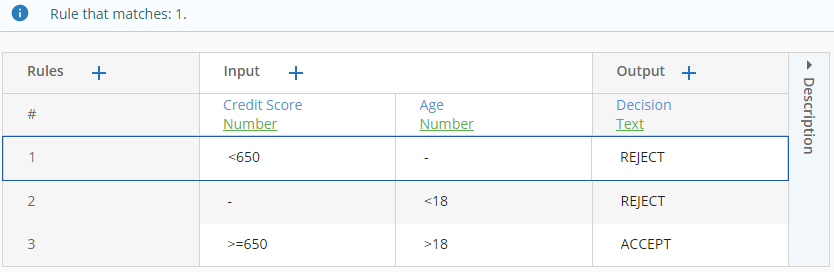
The following decision table describes a credit card approval policy. According to the policy, an applicant must have a minimum credit score of 650 and be 18 or older. Sometimes, rules 1 and 2 overlap, but because the two produce the same output, the decision table validates successfully.
Example
An applicant has a credit score of 620 and is 17 years old. Though the applicant matches rules 1 and 2, the decision table editor only highlights the first match:
First Hit Policy
A decision table with this hit policy can have more than one rule match, but only the first match is returned, based on the order of the rules. The decision table stops evaluating the rules once it finds the first match.
Sample
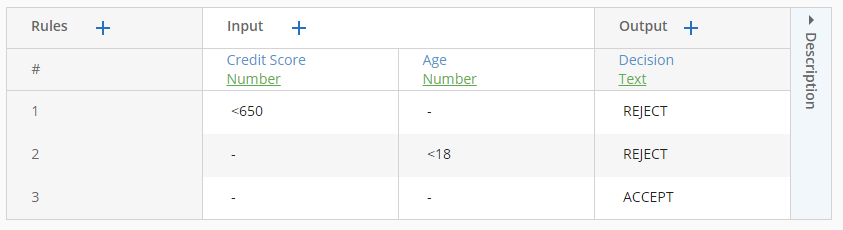
The following decision table describes a credit card approval policy. According to the policy, an applicant must have a minimum credit score of 650 and be 18 or older. Because the rules are evaluated starting from the first rule, the final rule only matches when the other rules do not.
Example
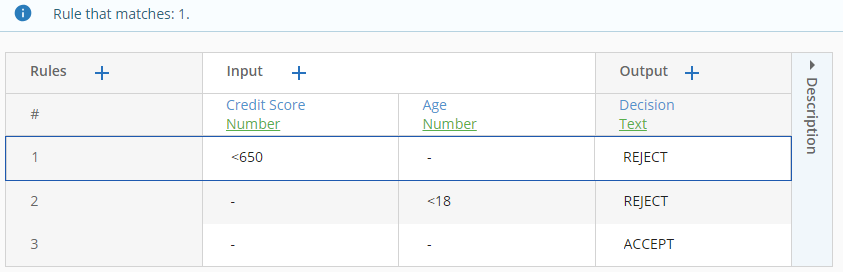
An applicant has a credit score of 640 and is 17 years old. Though the applicant matches all three rules, the decision table editor highlights the first match and returns its output:
Priority Hit Policy
A decision table with this hit policy can have more than one match, but only one match is returned based on the output priority. The output priority is determined by the order of the output fields and the order of the entries in the predefined list for each output field. Learn more about output priority.
Sample
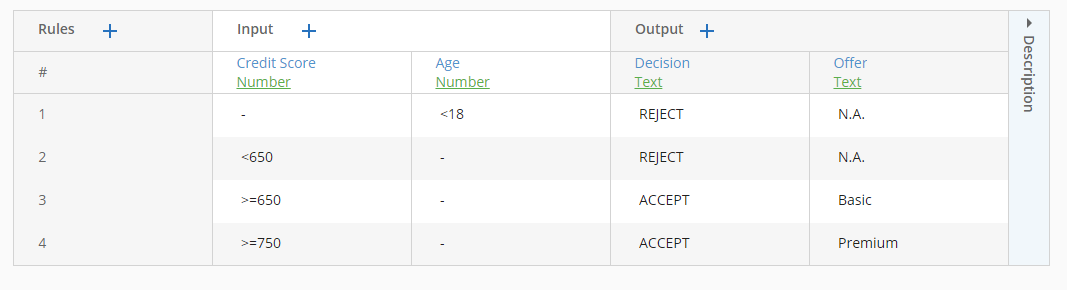
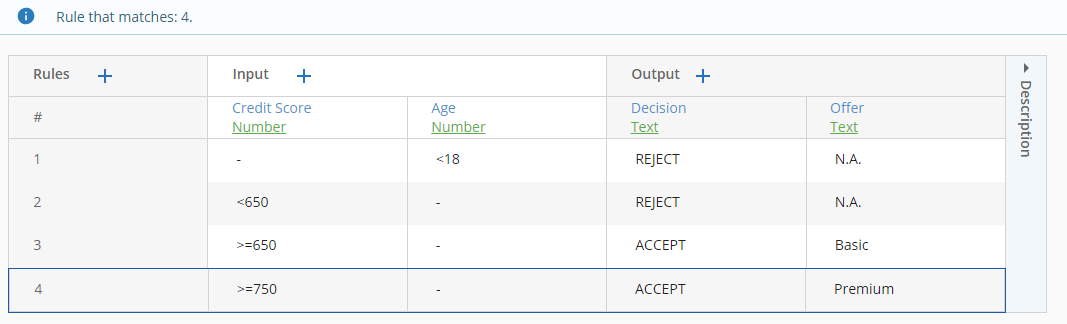
The following decision table describes a credit card approval policy. According to the policy, an applicant is offered a basic account if she is 18 or older and has a credit score of 650 or above, and is not under debt review. If she meets all those conditions and her credit score is 750 or above, she is also offered a premium account.The decision table can represent this logic with a Priority hit policy using the output priority.
Output Priority
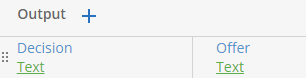
The output priority is determined by the order of the output fields and the order of the entries in the predefined list for each output field. You can view the output order by seeing how the output rows or columns are arranged in the decision table. Output rows/columns that are further to the left or closer to the top have higher priority. In our example, the Decision output has priority over the Offer output.
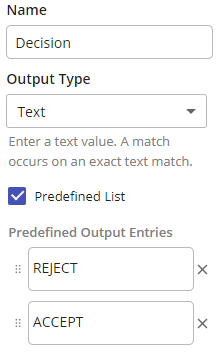
In the Decision output's properties dialog, you can view the following predefined list. "REJECT" has the highest output priority. The rules with this value (rules 1 and 2) are ranked first.
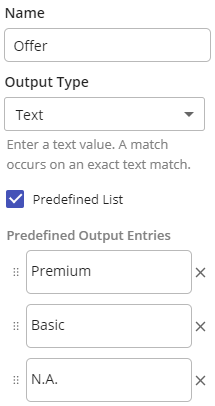
The predefined list for the Offer field is as follows. According to this order, if two rules have the same value for Decision, then rule 4 will have the highest priority, followed by rule 3.
Example
An applicant has a credit score of 763 and is 17 years old. Though the applicant matches rules 3 and 4, these rules tie on the value of Decision. To decide priority, we then look at the next most important output, which is Offer. Rule 4 has a higher priority value for Offer, so the decision table returns rule 4 as the output.
Multiple Hit Policies
No Order Hit Policy
This hit policy returns all matching rules in no particular order.
Sample
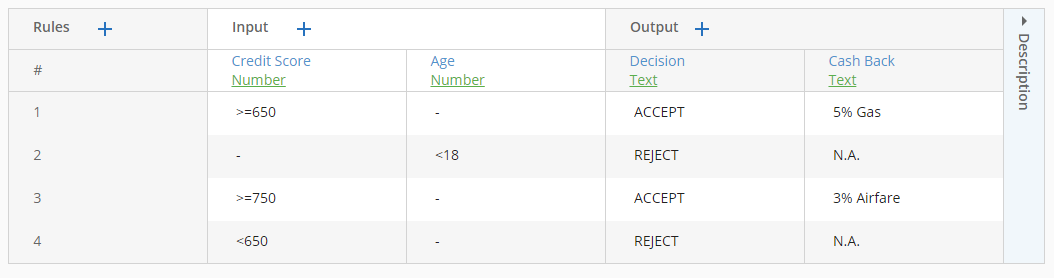
The following decision table returns all the promotions that an applicant qualifies for, in no particular order. The better an applicant's credit score, the more cash back promotions she qualifies for.
Example
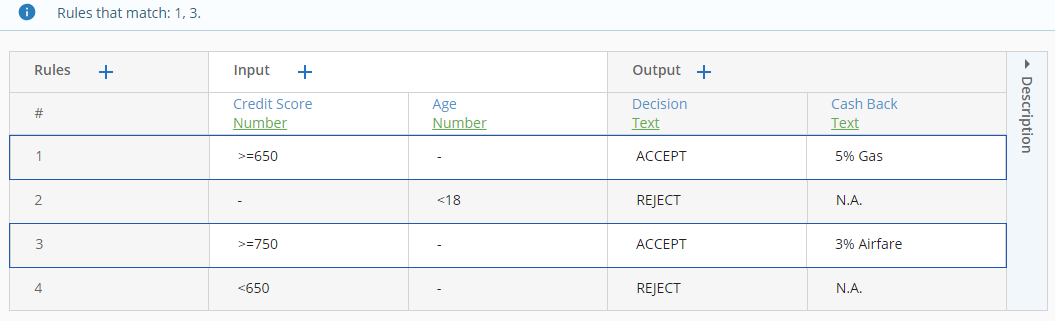
An applicant has a credit score of 760 and is 33 years old. Because the applicant matches rules 1 and 3, the decision table editor highlights all those matches:
Rule Order Hit Policy
A decision table with this hit policy returns all matches based on the order of the rules. This hit policy for multiple hits is equivalent to the First hit policy for single hits.
Sample
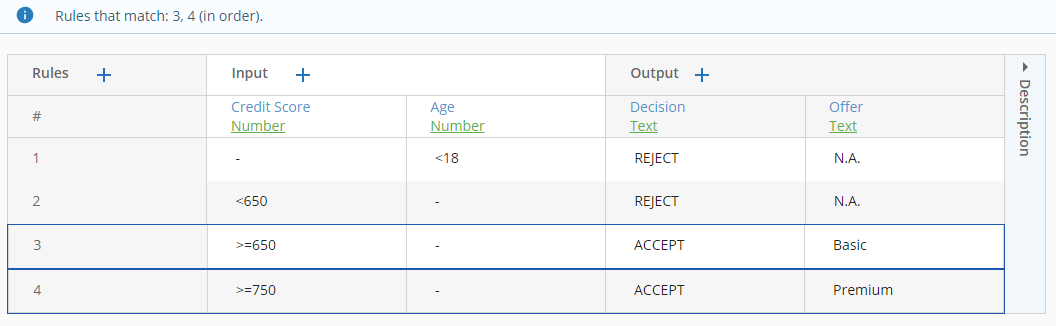
The following decision table ranks credit cards that an applicant qualifies for, selecting by the applicant's age and credit score.
Example
An applicant is 25 and has a credit score of 780. The applicant matches rules 3 and 4 (in that order).
Output Order Hit Policy
A decision table with this hit policy can have overlapping rules that have different output values. When more than one rule matches, the decision table returns each matching rule starting with the entry with the highest output priority. The output priority is determined by the order of the output fields and the order of the entries in the predefined list for each output field. This hit policy for multiple hits is equivalent to the Priority hit policy for single hits. Learn more about output priority.
Sample
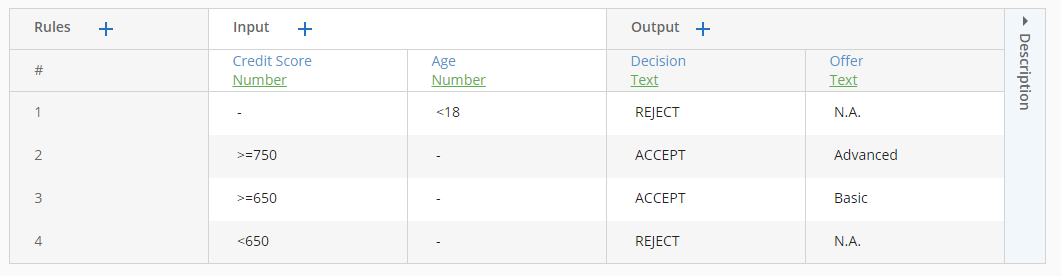
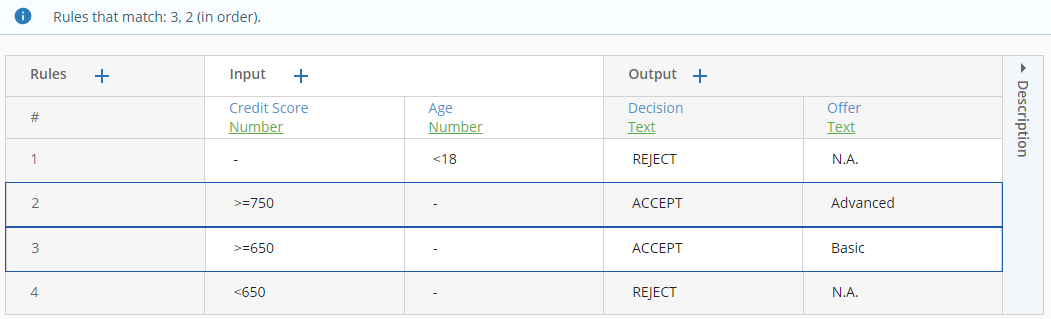
The following decision table ranks credit offers that an applicant qualifies for.
If an applicant is accepted, they can choose from the following list of offers, as detailed in the properties pane of the Offer output:
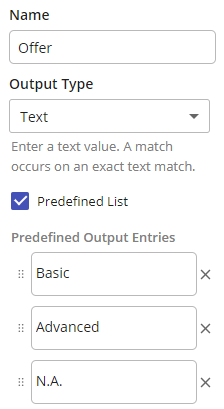
The order of the entries under Predefined Output Entries ensures that if multiple results are returned for an accepted applicant, the results with a value of "Basic" for the Offer output are returned before the results with a value of "Advanced".
Example: An applicant has a credit score of 763 and is 21 years old. The decision returns rows 3 and 2 (in that order) for this applicant. In the table, Decision has higher priority than Offer (because it's to the left of Offer). Since the values of Decision for both returned results are ACCEPT, the results cannot be sorted based on the values of Decision. Instead, the results are sorted based on the values of Offer. When we configured the output entries of Offer above, we ranked Basic above Advanced. Therefore, row 3 is returned before row 2.
Output Priority
The output priority is determined by the order of the output fields and the order of the entries in the predefined list for each output field. You can view the output order by the position of the output's row/column in the decision table. Click the handle (represented by six dots) to drag and drop an output row/column. Output priorities decrease as you proceed to the right and to the bottom of the decision table, i.e. the leftmost or topmost outputs have the highest priorities.
In the Decision field, you can view the predefined list (below). In the screenshot, REJECT has the highest output priority. In our example, this did not matter because both results had a value of ACCEPT for Decision.
However, we saw earlier that for the Offer output, the value Basic has highest priority, followed by Advanced, then N.A.. For that reason, row 3 in our table has higher priority than row 2.
Single Result Hit Policy
A decision table with this hit policy returns the matching rules aggregated by some function. The functions include sum, minimum, maximum, count (the number of distinct outputs), and average. The decision table cannot have more than one output field.
Sample
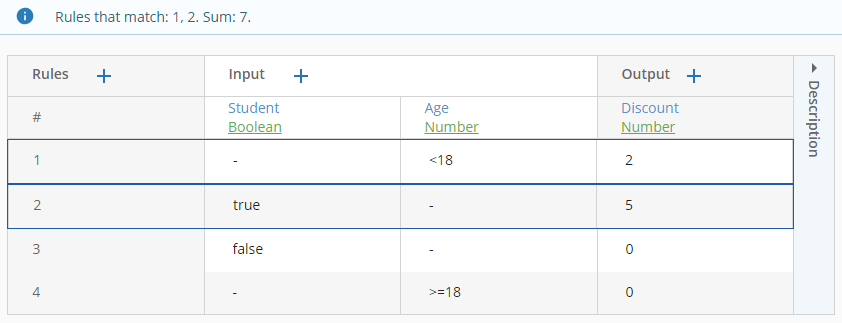
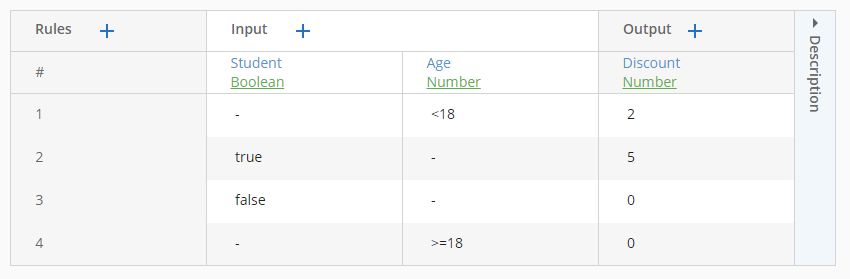
The following decision table calculates the percentage discount a customer gets based on their age and whether they are a student. Anyone younger than 18 gets a 2% discount, and students get a 5% discount. If the customer satisfies multiple criteria, they can sum the discounts.
Example
An applicant is a 17-year-old student. Because the applicant matches rules 1 and 2, the decision table editor outlines those rules and returns the sum (7%):