History
The History node in the Quick Fields Agent Administration Console displays a list of all instances in which Quick Fields sessions have run according to a schedule. From this node, you can review run details, filter and export history data, and analyze individual session runs.
| Task | Action |
|---|---|
| Display additional information or hide information |
|
| Refresh the information |
|
| Filter the information displayed |
|
| Export the list of schedules |
|
| Analyze run instances of a session |
|
History Filter Settings
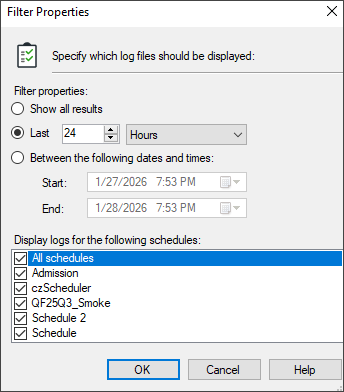
You can filter the information displayed in the History node to show only the session runs you want to review.
Note: The data available in the History node is limited by the Log Retention settings for Quick Fields Agent. For example, if session logs are deleted after five days, only history from the past five days is available. You can further filter available data, but you cannot retrieve data that has already been deleted.
To change the filter settings for the History node
- Select the History node.
- Right-click and select Filter properties.
- The Filter Properties dialog box opens.
- Under Filter properties, select one of the following options:
- Show all results: Displays all available session history within the retained logs.
- Last: Displays a specified number of session instances or a specified time period.
- Between these two dates and times: Displays session history between two specified dates and times.
- Under Display logs for the following schedules, do one or both of the following:
- Select All schedules to include or exclude all schedules.
- Select individual check boxes to include or exclude specific schedules.
- Click OK to apply the filter and close the dialog box.